
There’s a category of problem that sounds simple — “get a GPU working on my Kubernetes cluster” — and then reveals itself to be a three-week saga involving kernel headers, incompatible runtimes, OS rebuilds, and at least one full wipe of a production cluster. This is that story.
The Goal #
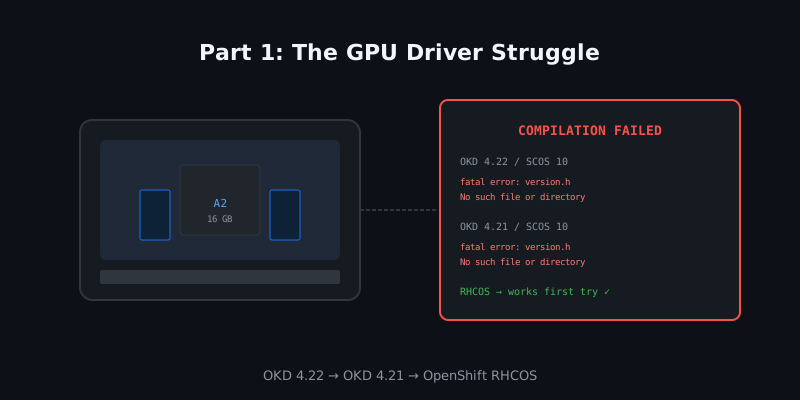
Simple enough, right?
Attempt 1: OKD 4.22 on CentOS Stream CoreOS 10 #
My cluster was running OKD 4.22 at the time. OKD is the community distribution of OpenShift, and 4.22 uses CentOS Stream CoreOS 10 (SCOS 10) as the node OS. SCOS 10 is built on CentOS Stream 10, which is upstream of RHEL 10.
The NVIDIA GPU Operator needs to compile the kernel module (nvidia.ko) on each node. To do that, it needs the kernel headers that match the running kernel. On RHCOS (Red Hat CoreOS), the driver toolkit image is well-maintained by Red Hat and ships the exact headers. On SCOS 10, the situation was… not that.
# What I saw in the driver-toolkit init container logs:
make[1]: Entering directory '/usr/src/kernels/6.11.0-35.el10.x86_64'
  CC [M]  /tmp/nvidia/src/nv.o
/tmp/nvidia/src/nv.c:237:10: fatal error: generated/uapi/linux/version.h: No such file or directory
The kernel headers package for SCOS 10’s kernel wasn’t available in the driver toolkit image used by the GPU Operator. The operator’s driver toolkit is tied to OKD releases and there was no matching image for the SCOS 10 kernel at that point. I spent a day trying to manually pull the right kernel-devel RPMs, mount them into the toolkit image, and re-run the compilation. It worked… until the next node reboot, when the kernel minor version had shifted and the whole thing fell apart again.
Attempt 2: OKD 4.21 #
OKD 4.21 also uses SCOS 10. Same problem, different minor version. I burned a day proving this was not going to work without a significant toolchain effort I wasn’t willing to sign up for.
At this point I had two realistic options:
- Pin kernel updates and manually maintain matching driver toolkit images. This is what some production shops do, but it’s operational debt I don’t want in a homelab.
- Switch to Red Hat OpenShift with RHCOS. Red Hat actually maintains the driver toolkit for RHCOS, and the GPU Operator has first-class support for it.
The Decision: Full Wipe to Red Hat OpenShift #
Red Hat offers a 60-day trial of OpenShift, no credit card required. I had looked at it before and decided the community OKD was good enough. After two failed attempts at NVIDIA drivers, I changed my mind.
The wipe was non-trivial. I had production workloads running: Grafana, VictoriaMetrics, Invoice Ninja, Semaphore, Authentik, Gitea, Flowise, Hermes. I had to:
- Take etcd snapshots of the OKD cluster
- Export all namespace manifests
- Dump all databases to files
- Re-install with the OpenShift installer (IPI, bare-metal)
- Restore databases into the new CloudNativePG and Percona XtraDB clusters
- Re-apply all GitOps manifests
The topology also got a fix at the same time. My OKD cluster had only two etcd members (a known footgun — losing either one stops all writes). I added a third control-plane node during the rebuild. The new cluster has ocp-cp01, ocp-cp02, ocp-cp03, and ocp-w01 with the A2 GPU.
# install-config.yaml (excerpt)
platform:
  baremetal:
    apiVIP: 10.20.30.31
    ingressVIP: 10.20.30.30
The install took about 45 minutes from openshift-install create cluster to a healthy API. No drama.
NVIDIA GPU Operator on RHCOS #
On RHCOS, the GPU Operator worked on the first try.
oc apply -f https://raw.githubusercontent.com/NVIDIA/gpu-operator/main/deployments/gpu-operator/values.yaml

# Within 10 minutes:
kubectl get pods -n gpu-operator
NAME                                       READY   STATUS    RESTARTS
gpu-feature-discovery-...                  1/1     Running   0
nvidia-container-toolkit-daemonset-...     1/1     Running   0
nvidia-cuda-validator-...                  0/1     Completed 0
nvidia-device-plugin-daemonset-...         1/1     Running   0
nvidia-driver-daemonset-...                1/1     Running   0
nvidia-operator-validator-...             1/1     Running   0
The operator detected the A2, compiled the driver against RHCOS’s shipped kernel headers (which are always present in the driver toolkit image), and validated CUDA. The whole process was invisible to me — it just worked.
oc exec -n gpu-operator deploy/gpu-operator -it -- nvidia-smi
+-----------------------------------------------------------------------------------------+
| NVIDIA-SMI 570.86.15              Driver Version: 570.86.15    CUDA Version: 12.8       |
|-----------------------------------------+------------------------+----------------------+
| GPU  Name                 Persistence-M | Bus-Id          Disp.A | Volatile Uncorr. ECC |
| Fan  Temp   Perf          Pwr:Usage/Cap |           Memory-Usage | GPU-Util  Compute M. |
|=========================================================================================|
|   0  NVIDIA A2                      Off |   00000000:01:00.0 Off |                    0 |
|  N/A   30C    P8              8W /  60W |       1MiB /  16376MiB |      0%      Default |
+-----------------------------------------------------------------------------------------+
16 GB of VRAM, ready to go. On to the model.
What I Learned #
- SCOS 10 (OKD 4.21/4.22) does not have reliable NVIDIA driver support at this point in time. The kernel headers mismatch is a toolchain gap, not a configuration error. Pinning kernels is a viable workaround but adds operational overhead.
- RHCOS has first-class NVIDIA GPU support through the driver toolkit. The GPU Operator’s
ClusterPolicyis designed for this OS and it shows. - A 60-day OpenShift trial is a real cluster, not a sandbox. The license is applied to a real
ClusterVersionobject and the full operator catalog is available. I used it to evaluate whether I’d stay on OpenShift long-term. (Spoiler: I did.) - Rebuilding the cluster was an opportunity to fix the two-member etcd footgun. Two etcd members = split-brain risk. Three is the correct minimum. The rebuild was worth doing for this reason alone.
Next up: with the GPU working, which model actually fits in 16 GB and performs well enough to be useful? Part 2: Finding the Right Model →