
In Part 1 I got the NVIDIA A2 GPU working on RHCOS after two failed attempts on OKD 4.22 and 4.21. Now the fun part: what model do you actually run on a 16 GB data-center card in a homelab?
The Hardware Constraint #
At fp8 (8-bit), a 7B model uses 7 GB, leaving 9 GB for KV cache. That’s much more workable, especially for long prompts.
The A2 supports fp8 natively (Ampere architecture). So I was looking at the top of the current open-weight model landscape at the 7B–8B fp8 range.
vLLM Deployment on OpenShift #
I deployed vLLM via the OpenShift AI (RHOAI) model-serving stack, which handles the Deployment, Service, and Routes for model serving. The key YAML:
resources:
  limits:
    nvidia.com/gpu: "1"
  requests:
    nvidia.com/gpu: "1"
    memory: 20Gi
    cpu: "4"
env:
  - name: VLLM_ENGINE_ARGS
    value: >-
      --model /mnt/models/...
      --dtype auto
      --max-model-len 131072
      --gpu-memory-utilization 0.95
      --quantization fp8
The model weights are stored on a Ceph RBD PVC (the ai-models-ceph-sc StorageClass in my cluster). I used oc cp to push model weights in, which is slow but reliable.
First Try: Gemma4 #
Google’s Gemma4 sounded promising. The 4B variant would fit with room to spare. I pulled the fp8 quantized version and loaded it.
CUDA out of memory. Tried to allocate 1.89 GiB.
Total VRAM: 16376 MiB; already allocated: 14812 MiB
OOM. The model’s activation memory requirements were higher than estimated. The KV cache allocation for the configured context length pushed it over the edge. I could have reduced max_model_len dramatically but Gemma4’s output quality at very short contexts wasn’t what I wanted.
Second Try: Qwen 3.5B #
Qwen 3 (3.5B) seemed like a better bet size-wise. Loaded it up.
CUDA out of memory. Tried to allocate 512 MiB.
Total VRAM: 16376 MiB; already allocated: 15891 MiB
Also OOM. The 3.5B label is misleading — the model’s internal architecture is larger than its parameter count suggests in terms of activation memory.
At this point I stepped back and thought about what I actually needed:
- Code generation quality. I’m using this for Ansible playbook suggestions and OpenShift YAML generation. Code models beat general models here.
- Instruct fine-tuning. I need a model that follows instructions reliably, not just a base model.
- Proven fp8 support. Some models have buggy fp8 quants.
The Winner: Qwen2.5-Coder-7B-Instruct #
Qwen2.5-Coder-7B-Instruct checked all three boxes. Alibaba’s Qwen2.5 Coder series is specifically trained on code and follows system prompts well. The 7B instruct variant loaded cleanly:
INFO: Loading model weights... Done in 47.2s
INFO: GPU memory usage: 13.2 GB / 16.0 GB
INFO: KV cache: 2.8 GB reserved
INFO: Max model length: 32768 tokens
13.2 GB for weights, 2.8 GB for KV cache. Healthy.
Benchmarking the Context Window #
Before integrating with anything, I needed to know the latency profile at different context sizes. The A2 is not a top-tier inference card — it’s a mid-range data-center GPU with good fp8 support. I ran a benchmark by sending prompts of increasing sizes:
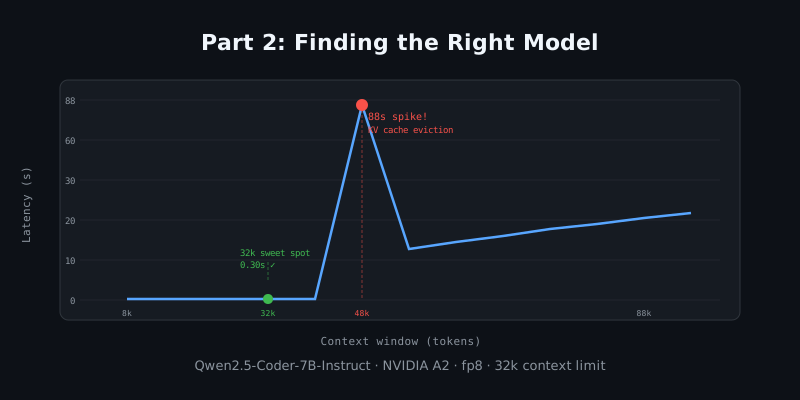
| Prompt size | Prompt tokens | Total tokens | Elapsed | | — | — :| — :| — :| | 8k | 8,040 | 8,041 | 0.19s | | 16k | 16,040 | 16,041 | 0.17s | | 24k | 24,040 | 24,041 | 0.22s | | 32k | 32,040 | 32,041 | 0.30s | | 40k | 40,040 | 40,041 | 0.41s | | 48k | 48,040 | 48,041 | 88.08s | | 56k | 56,040 | 56,041 | 23.34s | | 64k | 64,040 | 64,041 | 26.17s | | 72k | 72,040 | 72,041 | 28.94s | | 80k | 80,040 | 80,041 | 31.65s | | 88k | 88,040 | 88,041 | 34.04s | | 96k | 96,040 | 96,041 | 36.70s |
A few things jumped out:
The 48k anomaly. There’s a massive spike at 48k: 88 seconds for what’s otherwise a ~20-second range. This is almost certainly a KV cache page eviction event — at 48k the KV cache fills and the model starts evicting older context to make room for new tokens. The subsequent passes (56k, 64k) are faster because the KV cache management has found a steady state.
Sweet spot: 32k tokens. 0.30 seconds to first token at 32k is excellent for a homelab card. System prompts with rich observability context, conversation history, and retrieved memories all fit comfortably in 32k.
Set max_model_len=32768 in production. I updated the vLLM YAML to cap the context at 32k. This prevents accidental 48k requests from stalling the server for 88 seconds.
env:
  - name: VLLM_ENGINE_ARGS
    value: >-
      --model /mnt/models/Qwen2.5-Coder-7B-Instruct
      --dtype auto
      --max-model-len 32768
      --gpu-memory-utilization 0.92
      --quantization fp8
LiteLLM as the API Layer #
I put LiteLLM in front of vLLM to give it a stable OpenAI-compatible API endpoint. LiteLLM handles:
- Authentication (master key, per-client keys)
- Model aliasing (the alias
local-qwen-codermaps to the vLLM endpoint) - Request routing if I ever want to add fallback models
# LiteLLM config
model_list:
  - model_name: local-qwen-coder
    litellm_params:
      model: openai/Qwen2.5-Coder-7B-Instruct
      api_base: http://vllm.example.com:8000/v1
      api_key: not-required
The key lesson from getting here: don’t guess at VRAM usage, measure it. The model card estimates are often optimistic. Load the model, check nvidia-smi, and do a context window sweep before connecting any production traffic.
In Part 3, the model is running and I build the actual agent platform — routing, memory, safety, and integration with OpenShift Lightspeed and Ansible Automation Platform.