
In Part 1 I got the NVIDIA A2 GPU working on RHCOS. In Part 2 I benchmarked my way to Qwen2.5-Coder-7B-Instruct on a 32k context budget. Now the model is running — but a raw OpenAI-compatible endpoint isn’t an AI agent. It has no memory, no tools, no safety, and no routing. Building all that is the subject of this post.
The Architecture Problem #
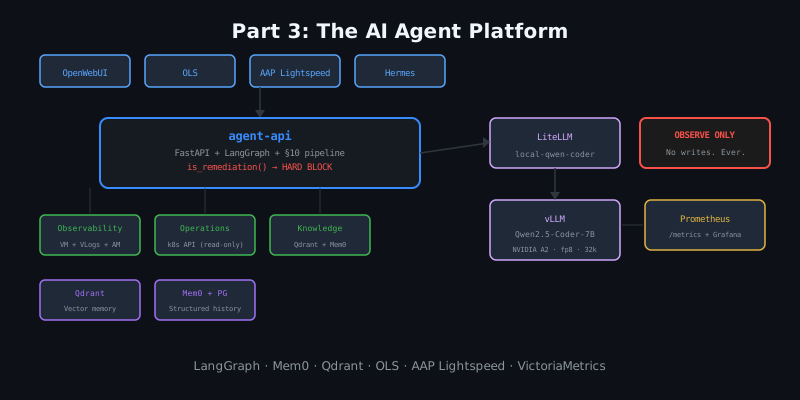
What I actually want:
- The model should remember things I tell it across sessions
- It should be able to look at current metrics and logs when I ask about them
- It should be able to read cluster state (ArgoCD apps, degraded operators)
- It should be connected to OpenShift Lightspeed and Ansible Lightspeed so I can use it directly in the tools I already use
- It should never execute anything without my explicit approval
Points 1–4 are features. Point 5 is a hard constraint. I’ve seen too many “AI ops” demos where the model happily restarts pods or deletes namespaces. I wanted the safety gate to be in code, not in the prompt.
The Platform Architecture #
OpenWebUI / Hermes / OLS / AAP Lightspeed
           │
           ▼
    agent-api :8080    ← single entry point
    (FastAPI + LangGraph)
     │     │     │
     │     │     └── policy.py → is_remediation() ← HARD BLOCK in code
     │     │
     │     ├── ObservabilityTools (VictoriaMetrics + VLogs + Alertmanager)
     │     ├── OperationsTools (k8s API read-only via SA token)
     │     └── KnowledgeTools (Qdrant semantic search)
     │
     ├── MemoryStore (Qdrant + Mem0 + Postgres)
     │
     └── LiteLLM → vLLM (Qwen2.5-Coder-7B)
Everything that talks to the model goes through agent-api. There is no other path.
The Fixed Pipeline #
Every request runs this pipeline regardless of the question:
1.  Write request metadata to Postgres (audit_events + conversations/messages)
2.  Search Qdrant for relevant semantic memory
3.  Search Postgres for recent conversation history
4.  Search Mem0 for user preferences
5.  Build context package (system prompt with memory + live data)
6.  Classify request → route to observability / operations / knowledge agent
7.  Call vLLM through LiteLLM (clean request: no tool_choice, no tools)
8.  Store response in Postgres
9.  Extract durable memory from the conversation
10. Store durable memory in Qdrant + Mem0
The memory pipeline is enforced by architecture, not by the prompt. I’m using Mem0 for the memory service and Qdrant as the vector store, with a local TEI (Text Embeddings Inference) instance running bge-small-en-v1.5 (384 dimensions) for embeddings — no OpenAI calls.
The Safety Gate #
# policy.py — the hard gate
_REMEDIATION_VERBS = (
    "restart", "reboot", "delete", "remove", "scale", "patch", "apply",
    "sync", "prune", "rollout", "drain", "cordon", "silence", "kill",
    "evict", "taint", "annotate", "label ", "rollback", "redeploy",
)

def is_remediation(text: str) -> bool:
    """True if the user is asking to DO a write/remediation action."""
    t = text.lower()
    return any(v in t for v in _REMEDIATION_VERBS)
If is_remediation() returns True, the request is flagged in the audit log and the model is instructed to refuse execution, give a risk assessment, show the exact command, and state that human approval is required. The model doesn’t decide this — the code does.
I deliberately didn’t put this in the system prompt because prompts can be overridden by a sufficiently creative user. The code check runs before the model call.
Three Read-Only Agents #
The classify_request() function routes the question to one of three sub-agents:
- Observability agent: queries VictoriaMetrics (PromQL), VictoriaLogs (LogsQL), and Alertmanager for live data
- Operations agent: reads ClusterOperator status, ArgoCD Application sync state, and unhealthy pod list via the k8s API
- Knowledge agent: searches the Qdrant collections for relevant remembered context
The SA token (ai-agent-readonly) can only read — no create, update, delete, patch, or watch-with-write-intent. I verified this with oc auth can-i before going live.
Hard-Won Implementation Lessons #
Building this on OpenShift in a production namespace had several gotchas:
1. enableServiceLinks: false is mandatory.
Kubernetes auto-injects <SERVICENAME>_PORT=tcp://ip:port environment variables for every Service in the same namespace. Mem0 parsed QDRANT_PORT=tcp://172.31.250.38:6333 as an integer and crashed immediately. Setting enableServiceLinks: false on the Deployment fixes this.
2. FastAPI handlers must be sync, not async.
The original async def chat() handler ran blocking psycopg (Postgres) and httpx (LiteLLM) calls inside an async function. FastAPI runs async handlers in the event loop — blocking calls freeze the entire loop during the 10-second model call. The liveness probe times out, Kubernetes kills the pod, the pod restarts, repeat forever. Switching to def chat() (sync) causes FastAPI to run the handler in a thread pool. The event loop stays responsive, probes pass.
3. Streaming is non-negotiable for OLS.
OpenShift Lightspeed sends requests with stream: true. My initial agent-api only returned regular JSON responses. OLS received a 200 OK but couldn’t parse chunks from a non-stream response: “No generation chunks were returned.” I added an SSE (server-sent events) path that runs the full pipeline synchronously first (context gathering + model call), then emits the response as OpenAI-format data: chunks. OLS can’t tell the difference from a real streaming model.
def _make_sse_chunks(conv_id, answer, usage, agent, ...):
    chunk_id = f"chatcmpl-{conv_id}"
    # Chunk 1: role announcement
    yield f"data: {json.dumps({..., 'choices': [{'delta': {'role': 'assistant', 'content': ''}}]})}\n\n"
    # Chunk 2: content in 500-char pieces
    for i in range(0, len(answer), 500):
        yield f"data: {json.dumps({..., 'choices': [{'delta': {'content': answer[i:i+500]}}]})}\n\n"
    # Final: finish_reason=stop
    yield f"data: {json.dumps({..., 'choices': [{'delta': {}, 'finish_reason': 'stop'}]})}\n\n"
    yield "data: [DONE]\n\n"
4. JSON capping for JSONB columns.
Some Alertmanager responses are 200+ KB of JSON. json.dumps(alerts)[:8000] truncates in the middle of a JSON string, producing invalid JSON that Postgres rejects with InvalidTextRepresentation. The fix: serialize to JSON first, check length, and if too long, return a valid truncation:
def _capped_json(obj, limit=8000):
    s = json.dumps(obj)
    if len(s) <= limit:
        return s
    return json.dumps({"_truncated": True, "preview": s[:limit - 200]})
5. OVN-Kubernetes egress NetworkPolicy silently breaks DNS.
I tried to add an egress NetworkPolicy to restrict what the agent-api pod could reach. Under OVN-Kubernetes, egress rules using podSelector, namespaceSelector, or ipBlock don’t reliably match traffic to Service ClusterIPs — the policy fires before DNAT (destination NAT) resolves the Service VIP to a pod IP. The practical result: DNS (UDP to the ClusterIP of kube-dns) broke silently. Every in-cluster hostname lookup failed. I removed the egress NetworkPolicy entirely. The right tool for OVN-K egress restriction is the EgressFirewall CR, which is OVN-native and fires after DNAT.
6. Memory search must cover all collections.
Qdrant stores remembered facts in five collections (agent_memories, user_preferences, incident_summaries, runbooks, architecture_notes). The original search_semantic() only queried agent_memories. Explicit “remember” phrases were stored to user_preferences but never retrieved. Fixed by searching all five collections and merging results by score.
Connecting the UIs #
Once agent-api was stable, I rewired all clients to point at it instead of LiteLLM:
OpenWebUI: OPENAI_API_BASE_URL → http://ai-agent-api.example.com:8080/v1
OpenShift Lightspeed (OLSConfig CR):
spec:
  llm:
    providers:
      - name: OpenAI
        type: openai
        url: http://ai-agent-api.example.com:8080/v1
        models:
          - name: ai-agent
Ansible Automation Platform Lightspeed (AnsibleLightspeed CR + out-of-band secrets):
spec:
  api:
    model_pipeline_secret: ansible-lightspeed-model-secret
  chatbot_config_secret_name: ansible-lightspeed-chatbot-secret
The secrets contain model_url: http://ai-agent-api.example.com:8080 and are applied with oc create secret — never in git.
Seeding the Memory #
After getting the platform working, I seeded the agent’s memory with 14 key homelab facts:
memories = [
    "Remember: The homelab OpenShift cluster has 3 CP nodes + 1 worker with NVIDIA A2 GPU...",
    "Remember: vLLM benchmarks show 32k context = 0.30s latency; 48k = 88s spike...",
    "Remember: All write operations are BLOCKED. Human approval required for any remediation...",
    # ...
]
for mem in memories:
    requests.post("http://agent-api/v1/chat/completions",
                  json={"messages": [{"role": "user", "content": mem}]})
The knowledge agent routes “remember” phrases through maybe_store(), which writes to both Qdrant and Mem0. On the next conversation, those facts surface as memories_used=5 context. The agent now knows my cluster topology without me explaining it every time.
Observability for the Agent #
The platform exposes Prometheus metrics via prometheus-fastapi-instrumentator:
ai_agent_requests_total{agent_type}— request rate by routing decisionai_agent_remediation_blocked_total— safety gate activationsai_agent_tokens_in/out_total— token consumptionai_agent_request_duration_seconds— end-to-end latency histogram (includes context gathering + model call)ai_agent_memory_hits_total— semantic memory retrievals
Pod annotations enable Alloy to scrape automatically:
annotations:
  prometheus.io/scrape: "true"
  prometheus.io/port: "8080"
  prometheus.io/path: "/metrics"
The Grafana dashboard lives under the “AI Agent” folder and shows latency percentiles, token rate, agent routing split, and the remediation block counter — that last one being my canary for whether anyone’s trying to use the model for write operations.
What’s Next #
The platform is in observe-and-recommend mode. The next step is building confidence in its recommendations before I consider enabling any write path. Right now I’m doing two things:
- Having conversations about my infrastructure. Every question the agent answers well is a validation that the tools and memory are working. Every incorrect answer is a signal to add more context to the seed memory.
- Watching the remediation counter. If it stays at zero, I’m not using the agent for ops questions. If it climbs, I know the routing is catching real intent.
When I trust the recommendations enough, I’ll add a human-approval workflow — probably through the approval gateway — and gate write actions through that rather than just blocking them.
The model is 7B parameters, running fp8 on a data-center GPU I paid a few hundred dollars for. It knows my infrastructure. It can see my metrics and logs. It won’t touch anything without permission. For a homelab, that’s pretty good.