
When I decided to run ERPNext on my homelab OpenShift cluster, I figured the official Helm chart would make it straightforward. It mostly did — but three non-obvious issues burned enough time that I want to write them down before I forget the details.
What I was trying to do #
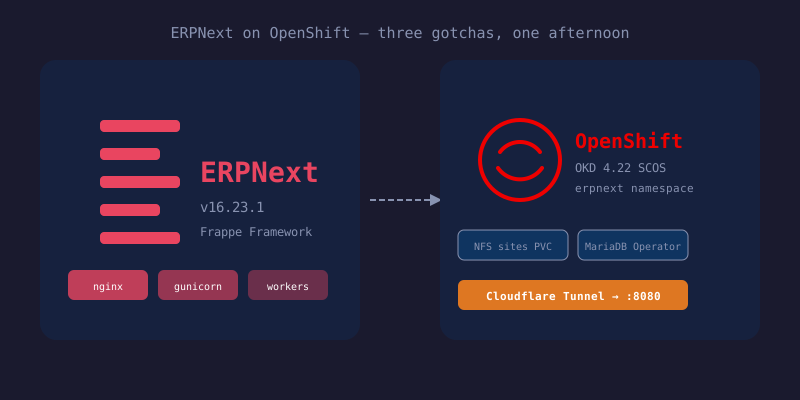
My constraints were:
- Use the existing MariaDB Operator instance (no bundled MariaDB)
- Static NFS storage for the Frappe sites directory
- No public exposure via Route or Ingress — only Cloudflare Tunnel
- Everything GitOps via ArgoCD
Gotcha 1: nginx.service.port controls the container port, not just the service
#
The first issue I hit was a classic “connection refused” from the nginx service. Everything looked right — nginx pod was Running, service had a ClusterIP endpoint — but curl to the service IP would immediately fail.
Digging in with ss -tlnp inside the container:
LISTEN 0 511 0.0.0.0:8080 ... users:(("nginx",...))Nginx was listening on 8080. But the service endpoint was 10.129.1.40:**80**. Nothing was on port 80 (nginx runs as UID 1000, can’t bind ports below 1024).
The culprit was my Helm values:
nginx:
  service:
    type: ClusterIP
    port: 80  # I wanted the service to listen on 80
What I didn’t realize: the ERPNext chart uses nginx.service.port for both the Kubernetes Service’s external port and the containerPort declaration in the Deployment. Here’s the relevant bit from the chart template:
ports:
  - name: http
    containerPort: {{ .Values.nginx.service.port }}
So setting service.port: 80 told Kubernetes that the container’s http port was 80 — which became the service endpoint — but nginx was actually running on 8080. The Kubernetes Service endpoint faithfully routed to pod:80 (nothing there → connection refused).
The fix: leave nginx.service.port at the chart default of 8080. Cloudflare Tunnel just needs to target :8080 instead of :80. No big deal.
Gotcha 2: FRAPPE_SITE_NAME_HEADER uses camelCase chart keys
#
When the Cloudflare Tunnel connects to the ERPNext service, it sends the public hostname (say, erp.example.com) as the Host header. Frappe uses the Host header to look up which “site” (multi-tenant Frappe supports multiple sites) to serve. My bench site was named erpnext.example.com — not erp.example.com — so Frappe would return a 404 with erp.example.com does not exist.
The fix is to pin the site name regardless of the incoming Host header. Looking at the nginx config template inside the container:
server_name ${FRAPPE_SITE_NAME_HEADER};
...
proxy_set_header X-Frappe-Site-Name ${FRAPPE_SITE_NAME_HEADER};
The template uses shell-style ${VAR} substitution via envsubst at container startup. When FRAPPE_SITE_NAME_HEADER is set to erpnext.example.com, the generated nginx config hardcodes it — any Host header now routes to the right site.
The Helm values key for this is not FRAPPE_SITE_NAME_HEADER (the env var name). It’s camelCase:
nginx:
  environment:
    frappeSiteNameHeader: "erpnext.example.com"
I wasted time trying nginx.environment.FRAPPE_SITE_NAME_HEADER (which ArgoCD happily accepted without error) before pulling the chart and reading values.yaml properly.
Gotcha 3: Frappe creates a hash-named database, not the name you specify #
The chart’s jobs.createSite config runs bench new-site under the hood. I pre-created a erpnext database in MariaDB thinking bench would use it. It doesn’t.
Bench generates a database name by hashing the site name:
site: erpnext.example.com → database: _cf5d08b00e4772d9The pre-created erpnext database sits empty with 0 tables. The real database with 735 tables is the hash-named one. This is expected behavior — bench manages its own database naming — but it surprised me. Bench uses the MariaDB root credentials to create the database and user itself.
The bits that just worked #
On the OpenShift SCC side, anyuid binding for the erpnext ServiceAccount was enough. Frappe runs as UID 1000, the NFS volume is pre-created at 0777, and no CAP_CHOWN is needed. The Valkey containers also run as UID 1000 with readOnlyRootFilesystem: true.
The MariaDB Operator integration was clean: just point dbHost at mariadb.databases.svc.cluster.local, set dbRds: true (disables SHOW MASTER STATUS calls that MariaDB doesn’t allow), and provide root credentials via an existing Secret.
Valkey persistence: set dataStorage.enabled: false on both valkey-cache and valkey-queue. Cache and queue state is ephemeral — losing it on pod restart just means a small latency bump while Frappe repopulates.
End state #
$ curl -s -H 'Host: erp.example.com' http://erpnext.erpnext.svc.cluster.local:8080/ | grep '<title>'
  <title>Login</title>
All pods Running, site erpnext.example.com live with 735 tables, Cloudflare Tunnel pointed at :8080. The whole thing is GitOps-managed via a Helm Application in ArgoCD — no Route, no Ingress, no NodePort.
Cloudflare Tunnel config (in the tunnel connector):
- hostname: erp.example.com
  service: http://erpnext.erpnext.svc.cluster.local:8080
No Host header override needed — frappeSiteNameHeader: erpnext.example.com handles it.