
Hardware work on the homelab knocked out two OSDs on the control-plane nodes. What followed was a longer-than-expected recovery session with three distinct gotchas that I want to document before I forget them.
The setup #
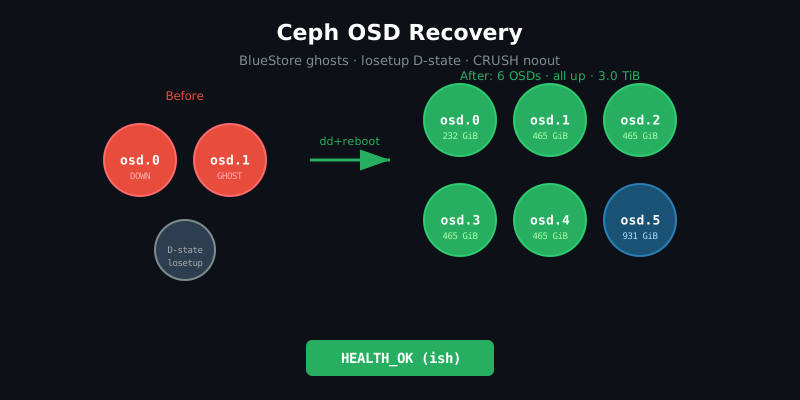
LocalVolumeSet. Six OSDs total:
| OSD | Node | Disk | Class |
|---|---|---|---|
| 0 | ocp-cp01 | sdd 232 GiB | ssd |
| 1 | ocp-cp01 | sdc 465 GiB | ssd |
| 2 | ocp-w01 | sda 465 GiB | ssd |
| 3 | ocp-cp03 | sda 465 GiB | ssd |
| 4 | ocp-cp02 | sda 465 GiB | ssd |
| 5 | ocp-cp02 | nvme 931 GiB | ai-nvme |
After removing a disk (sde) from cp01 during a hardware upgrade, I ended up
with:
- OSD-0 and OSD-1 on cp01 both down (various causes, see below)
ocs-devicesetcount=6 but only 5 physical disks remaining → one PVC permanently Pending
Gotcha 1: PNY CS900 SSDs do not zero on TRIM #
sdc on cp01 had previously hosted a different OSD — from a Ceph cluster that
no longer exists. I ran blkdiscard /dev/sdc to clear it, expecting that to
remove the old BlueStore label. It didn’t.
# This looks clean but isn't:
$ blkdiscard /dev/sdc && hexdump -C -n 64 /dev/sdc
00000000  00 00 00 00 00 00 00 00  ...
The all-zeros hex output is a lie. PNY CS900 drives report zeros on reads of
discarded blocks without actually erasing the underlying flash. Rook’s
ceph-volume still detected BlueStore signatures from the old cluster
(fsid 128179d4... ≠ current cb087c7c...) and refused to provision the OSD.
The fix is a full overwrite:
sudo dd if=/dev/zero of=/dev/sdc bs=4M status=progress conv=fsync
# Also blitz the end of disk to clear any GPT backup
sudo dd if=/dev/zero of=/dev/sdc bs=4M seek=$(($(blockdev --getsz /dev/sdc)/8-1)) count=1
After the full wipe, Rook’s ceph-volume lvm activate succeeded on the next
OSD prepare job.
The lesson: always dd zero drives that previously hosted a Ceph OSD,
especially consumer SSDs. blkdiscard is not reliable for clearing BlueStore
metadata.
Gotcha 2: losetup D-state blocks kubelet volume mounting — only a node reboot clears it #
While the sdc wipe was running, I triggered Rook to create a fresh OSD
prepare pod. The pod got stuck at Init:0/2 for 20+ minutes. The prepare
init container was waiting to mount the PVC backing /dev/sdc. Looking at the
node:
$ ssh core@ocp-cp01 sudo ps aux | grep losetup
root  3531762  ... D    03:01   0:01 losetup -f /var/lib/kubelet/plugins/kubernetes.io~local-volume/...
root  3376927  ... D    02:17   5:48 losetup -f /var/lib/kubelet/plugins/kubernetes.io~local-volume/...
Two losetup processes in D-state (uninterruptible sleep) — kernel-level
I/O wait. D-state processes cannot be killed with kill -9. The second one had
been there since 02:17, stuck trying to set up a loop device for the old
sde-backed PV (which was being wiped simultaneously).
Kubelet’s local volume plugin creates a block device node via losetup -f
when mounting a volumeMode: Block PVC. If the underlying block device is
busy or locked from a previous cleanup, this hangs indefinitely in D-state,
and every subsequent pod that tries to use any local Block PVC on that node
fails volume mounting with context deadline exceeded.
The only fix is a node reboot.
ssh core@ocp-cp01 sudo systemctl rebootAfter the reboot, losetup had no stale entries, the sdc PVC mounted
cleanly, and the prepare pod went from Init:0/2 → Running → Completed
in under a minute.
Gotcha 3: CRUSH host-level noout — different command than you think #
After all OSDs came back up, Ceph was HEALTH_WARN with:
[WRN] OSD_FLAGS: 1 OSDs or CRUSH {nodes, device-classes} have {NOUP,NODOWN,NOIN,NOOUT} flags set
    host ocp-cp01-homelab-example-com has flags noout
Rook had set noout on the CRUSH host bucket (not on individual OSDs)
during cp01’s maintenance drain. The intuitive clear commands don’t work here:
# WRONG — no such command:
ceph osd crush node unset-flag ocp-cp01-homelab-example-com noout

# WRONG — syntax rejected:
ceph osd unset-group noout host:ocp-cp01-homelab-example-com

# RIGHT — bucket name, no prefix:
ceph osd unset-group noout ocp-cp01-homelab-example-com
The ceph osd unset-group command in Ceph Tentacle (v20) takes the raw
bucket name, no host: prefix.
StorageCluster count mismatch #
With sde removed, the ocs-deviceset StorageCluster spec had count: 6 but
only 5 localblock-sc disks existed. This produced a permanently Pending PVC
(ocs-deviceset-0-data-10zxdln) with no OSD backing it, and cascaded into
OCS operator errors (“aborting OSD provisioning after waiting more than 20
minutes”).
The fix, in order:
# 1. Reduce count (safe — the Pending PVC has NO bound OSD, no data at risk)
kubectl patch storagecluster ocs-storagecluster -n openshift-storage \
  --type json \
  -p '[{"op":"replace","path":"/spec/storageDeviceSets/0/count","value":5}]'

# 2. Delete the orphan Pending PVC
kubectl delete pvc ocs-deviceset-0-data-10zxdln -n openshift-storage

# 3. Delete the orphan prepare Job
kubectl delete job rook-ceph-osd-prepare-ocs-deviceset-0-data-10zxdln -n openshift-storage

# 4. Trigger reconcile
kubectl annotate storagecluster ocs-storagecluster -n openshift-storage \
  rook.io/reconcile-trigger="$(date +%s)" --overwrite
ODF’s documentation says “you cannot reduce storage capacity” — this is true for removing an OSD that has data. A Pending PVC with no bound OSD and no data is a pure configuration artifact, not storage capacity. Reducing count here is safe.
Running Ceph CLI without a tools pod #
During recovery the rook-ceph-tools deployment kept getting recreated by
Rook reconcile, leaving windows where there was no tools pod. The alternative:
exec into any running OSD pod with a manually-constructed ceph.conf:
kubectl -n openshift-storage exec rook-ceph-osd-5-<hash> -c osd -- bash -c '
cat > /tmp/ceph.conf << EOF
[global]
fsid = cb087c7c-5453-496c-aa60-689019bb732c
mon_host = 172.31.201.152:3300,172.31.213.192:3300,172.31.148.176:3300
EOF
cat > /tmp/admin.keyring << EOF
[client.admin]
        key = AQCwbCxq+Ac9MhAAAStih8pV/QdfREGnKBb3cg==
EOF
chmod 600 /tmp/admin.keyring
ceph -c /tmp/ceph.conf --name client.admin --keyring /tmp/admin.keyring health detail
'
The mon endpoints are ClusterIPs from kubectl get cm rook-ceph-mon-endpoints -n openshift-storage -o jsonpath='{.data.data}'. The admin key comes from kubectl get secret rook-ceph-admin-keyring -n openshift-storage -o jsonpath='{.data.keyring}' | base64 -d.
Note: exec into mon pods or mgr pods doesn’t work — they don’t have the right ceph.conf in-container. OSD pods are the reliable choice.
Final state #
After all the above:
cluster:
  id:     cb087c7c-5453-496c-aa60-689019bb732c
  health: HEALTH_WARN
          1 pool(s) have no replicas configured   ← intentional (ai-models-pool size=1)

services:
  mon: 3 daemons, quorum c,f,h
  mgr: a(active), standbys: b
  osd: 6 osds: 6 up, 6 in

data:
  pgs: 217 active+clean
Six OSDs, all up, all in. The ai-models-pool HEALTH_WARN is intentional —
it’s a single-OSD pool for GPU model weights where redundancy isn’t needed.
Total recovery time: about 3 hours, most of it waiting for the dd wipe and
the Ceph rebalancing.