
I have spent years building observability stacks that are very good at answering one question.
What is broken right now?
This project is about the other questions.
- Which change ticket preceded the latency we saw last Tuesday?
- If this core switch goes down, how many services feel it?
- Where does the company actually lose time?
- What does “normal” look like for this device, so a model can tell when it isn’t?
Dashboards struggle with those.
Not because the data isn’t there. Because the data lives in five different systems that don’t know about each other.
So I built a place where they can meet.
The Idea #
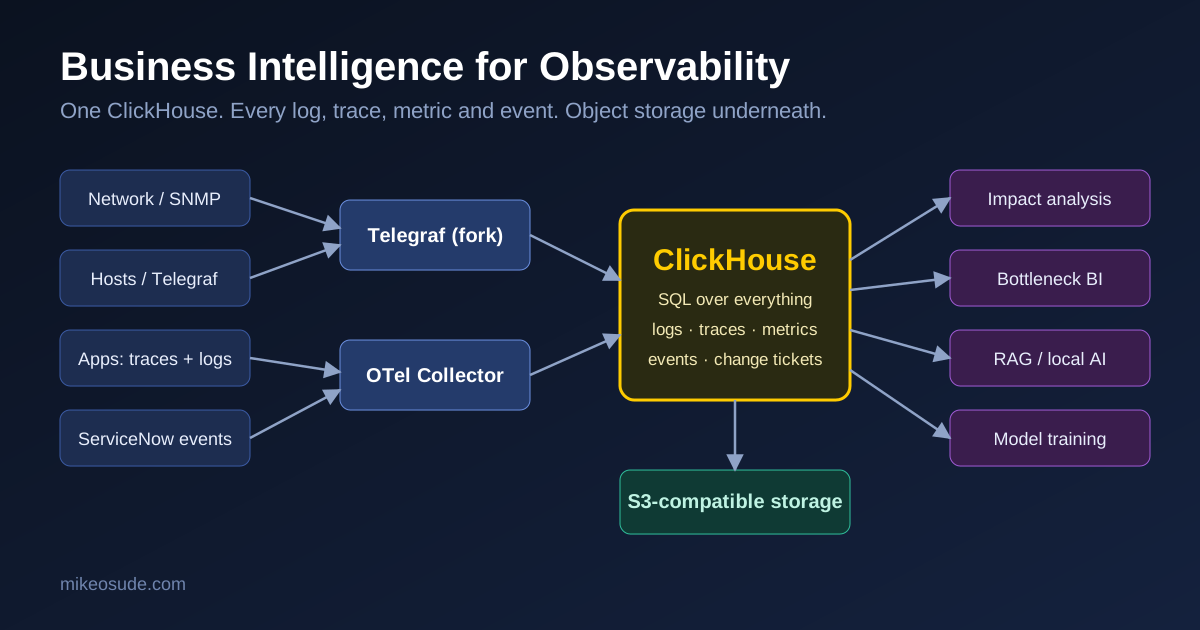
One analytical database.
Every log. Every trace. Every metric. Every event.
Sitting on S3-compatible object storage, queryable with plain SQL.
That’s it. That is the whole idea.
The rest of this post is about why that simple shape turned out to be so powerful.
Why ClickHouse #
I already run purpose-built tools for each signal. They are excellent at their job: time series for metrics, a log store for logs, a trace backend for traces.
What none of them do well is join across each other.
ClickHouse does.
- Columnar storage, so scanning billions of rows for one column is cheap
- Compression that makes long retention realistic
- SQL, which every analyst, engineer and AI model already speaks
- Object storage as a backing tier, so capacity is no longer a hardware purchase
When your telemetry is just tables, a question that used to need three tools and a spreadsheet becomes a single JOIN.
The Pipeline #
There are two ways data gets in, and I kept them deliberately separate.
1. SNMP: Telegraf forks the stream #
Network gear speaks SNMP. It always has.
Telegraf polls the devices once, then forks the result. One copy goes to the time series database that feeds live dashboards and alerting. The other goes to ClickHouse for long-term analysis.
I poll once, so the devices only get hit once. The forked copies make sure my real-time tooling and my analytics never compete with each other.
The ClickHouse side uses Telegraf’s SQL output, filtered so only the SNMP and interface measurements go there:
[[outputs.sql]]
  driver = "clickhouse"
  data_source_name = "http://user:cred@[fqdn/ip]:8123/db"
  timestamp_column = "timestamp"
  batch_transactions = true

  table_template = """
    CREATE TABLE IF NOT EXISTS {TABLE} (
      {COLUMNS}
    )
    ENGINE = MergeTree()
    PARTITION BY toYYYYMM({TIMESTAMP_COLUMN_NAME})
    ORDER BY ({TIMESTAMP_COLUMN_NAME})
  """

  table_update_template = "ALTER TABLE {TABLE} ADD COLUMN IF NOT EXISTS {COLUMN}"
  namepass = ["snmp", "interface"]
Two lines I like here:
namepasskeeps the firehose out. Only what I want lands in this database.table_update_templatemeans when a new OID or field shows up, the table grows a column. No migration, no ticket.
2. Everything else: the OpenTelemetry Collector #
Host metrics, application traces and logs all go through an OpenTelemetry Collector.
Telegraf collects host metrics (CPU, memory, disk, disk IO, network) and ships them over OTLP. Applications send traces and logs the same way. The Collector can also tail log files straight off a host with the filelog receiver.
Three pipelines, one exporter:
exporters:
  clickhouse:
    endpoint: tcp://clickhouse:9000?dial_timeout=10s
    database: otel
    create_schema: true
    async_insert: true
    compress: lz4
    ttl: 720h

service:
  pipelines:
    metrics:
      receivers: [otlp]
      processors: [memory_limiter, batch]
      exporters: [clickhouse]
    traces:
      receivers: [otlp]
      processors: [memory_limiter, batch]
      exporters: [clickhouse]
    logs:
      receivers: [otlp, filelog/host]
      processors: [memory_limiter, batch]
      exporters: [clickhouse]
A few things I learned the honest way:
- The ClickHouse exporter is not in the core Collector. You need the contrib distribution.
- Telegraf’s OpenTelemetry output carries metrics only. Logs and traces have to come from their own agents or SDKs.
create_schema: trueis great for getting started. Review what it generates, and set your retention (ttl) on purpose before production.- Resource attributes like
service.nameanddeployment.environmentare not decoration. They become the dimensions you group by later.
Object Storage Is the Quiet Hero #
Telemetry grows faster than anyone plans for.
The usual answer is to shorten retention. Which is exactly backwards, because the old data is what makes trend analysis and model training possible.
Putting ClickHouse on S3-compatible storage changes the economics:
- Capacity scales separately from compute
- Cold data costs a fraction of hot data
- Retention becomes a policy decision instead of a hardware constraint
Hot data stays fast. History stays available.
Where It Gets Interesting #
Collecting data is the easy part.
What I actually built was a place where different kinds of operational truth can be joined.
Impact analysis #
This is the one I care about most.
In a real environment, one action touches many things. A firmware change on an aggregation switch. A storage failover. A certificate that expires.
With metrics, logs and traces in the same database, I can follow a change outward:
- What else saw errors in the minutes after?
- Which services had latency shift?
- Which interfaces changed behavior?
Not by guessing. By querying.
ServiceNow in the same database #
I also load ServiceNow incidents and change tickets into ClickHouse.
That sounds small. It isn’t.
Now an incident is not just a ticket with a description. It is a row with a timestamp, a configuration item and a category, sitting next to the telemetry from the exact same window.
And a change ticket becomes something you can measure:
- What was the real blast radius of this change?
- Which types of change cause the most incidents?
- Which teams or windows carry the most risk?
Change management stops being a process people tolerate and becomes a dataset people learn from.
Bottlenecks across the company #
When everything is in one place, performance questions get bigger.
Not “why is this host slow” but:
- Where do slowdowns concentrate?
- Which dependency shows up in the most slow traces?
- What is the common factor across incidents that look unrelated?
That is the difference between monitoring a device and understanding a business.
Feeding the AI #
This is the part that convinced me the architecture was worth it.
Organizations everywhere want AI. Most discover they don’t have the data for it.
I do, because I have been collecting it all along, and now it is organized.
Training #
History plus context is training material. Years of normal behavior, labeled by the incidents and changes that happened around them, is exactly what an anomaly or forecasting model needs to learn from.
RAG for local knowledge #
The same database is a knowledge base.
Incident descriptions, resolution notes, change records and log patterns can be retrieved and handed to a model as context. Ask a question about your own environment and the answer is grounded in your own history, not a generic guess.
And because it all runs locally, none of it has to leave the building.
A general model knows what networks do in general.
This one knows what my network did last March.
It Already Runs My Homelab #
This isn’t theory. I’m living in it.
In my homelab, ClickHouse is already collecting:
- Every log from my UniFi UDM SE
- Home Assistant activity, every state change and automation
Two very different worlds. One database.
My AI reads what lands there and does something with it.
Firewall recommendations #
It watches what the UDM SE is seeing: blocked connections, noisy clients, odd traffic patterns. Then it recommends firewall rules.
It doesn’t just tell me something looks off.
It tells me what rule would fix it.
I still make the call on the firewall. That is a boundary I’m not ready to hand over.
Home Assistant, for real #
This is the part that still makes me smile.
The AI knows what is happening in the house because the activity is right there in ClickHouse. And it doesn’t stop at recommending.
It acts.
It turns lights and switches on and off through Home Assistant, based on what it sees.
Observability data stops being something I look at.
It becomes something the house responds to.
That is the same pattern as the enterprise version of this project, just smaller and more fun. Collect everything, keep it queryable, and let a model that understands your environment recommend and, where it makes sense, act.
What I’d Tell Someone Starting #
- Collect once, fork the stream. Don’t make your real-time tools and analytics fight for the same polling.
- Keep the SNMP path and the OTLP path separate. They have different shapes.
- Put resource attributes in early. You can’t group by something you never recorded.
- Bring your ticketing data in. It is the cheapest way to add meaning to telemetry.
- Decide retention deliberately. The defaults are a starting point, not a policy.
- Treat the database as an enterprise asset. It contains information about everything. Secure it like it does.
Final Thoughts #
I didn’t build this to replace my dashboards.
The dashboards still answer what is happening.
This answers why, what else, and what next.
Observability data is usually treated as exhaust. Something you keep for a few weeks in case of an outage.
I think it is one of the most valuable datasets a company has.
It is a continuous record of how the business actually runs.
The job is to put it somewhere you can ask it questions.